Commission Dashboard
Overview
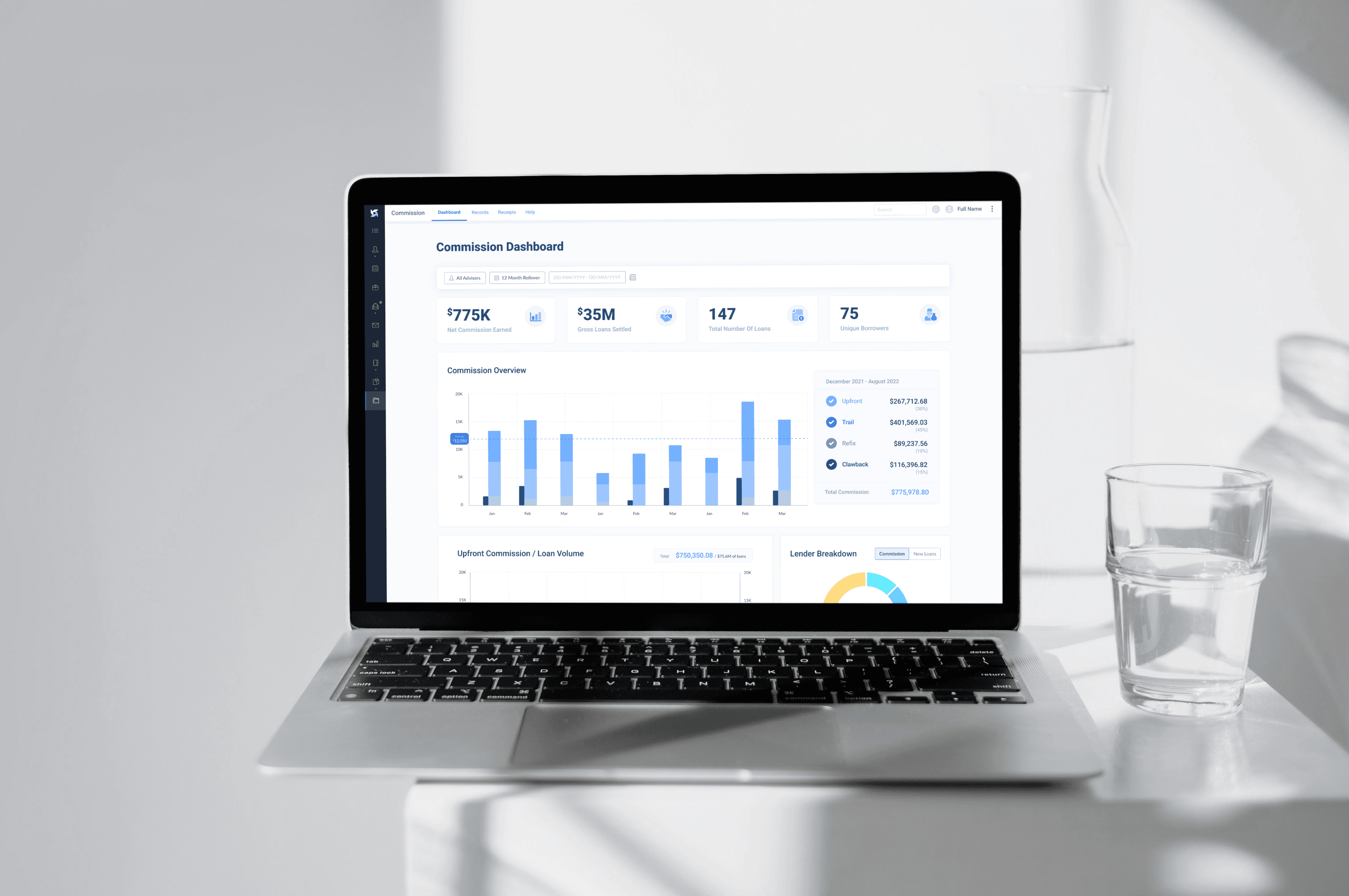
Trail is a SaaS platform designed for financial advisers. This project was a complete “0 to 1” build. We moved the entire user experience from static Excel receipts sent via email to a dynamic, visual Commission Dashboard, giving advisers their first real-time look at the financial health of their business.
Role
Lead UX Designer
Tools
Figma, FigJam, ClickUp
Timeline
8 weeks
Stakeholders
Product Owner, Technical Lead, Financial Compliance Officers
Click to expand
What we set out to solve
The Problem
Previously, advisers received their commission data as a raw Excel sheet. While this contained the necessary numbers, it was nearly impossible to see trends, lender dependencies, or the immediate impact of “Clawbacks” at a glance. Advisers were spending hours in spreadsheets just to understand if their business was actually growing.
The Solution
We designed a comprehensive dashboard that categorises income into four distinct pillars: Upfront, Trail, Refix, and Clawback. By utilising interactive charts and real-time filtering, we empowered advisers to move from manual data entry to proactive management with actionable business intelligence.
Spreadsheet Void
Advisers originally received their data as flat Excel files; there was no visual interface to track performance or trends.
Latency in Insights
Because data was trapped in receipts, advisers had to manually create pivot tables in external software just to understand which lenders they were favouring.
Hidden Financial Receipts
“Clawbacks” (returned commissions) were buried in rows of text, making it difficult for business owners to anticipate or manage financial dips.
Discovery
Identifying Friction
User Interviews
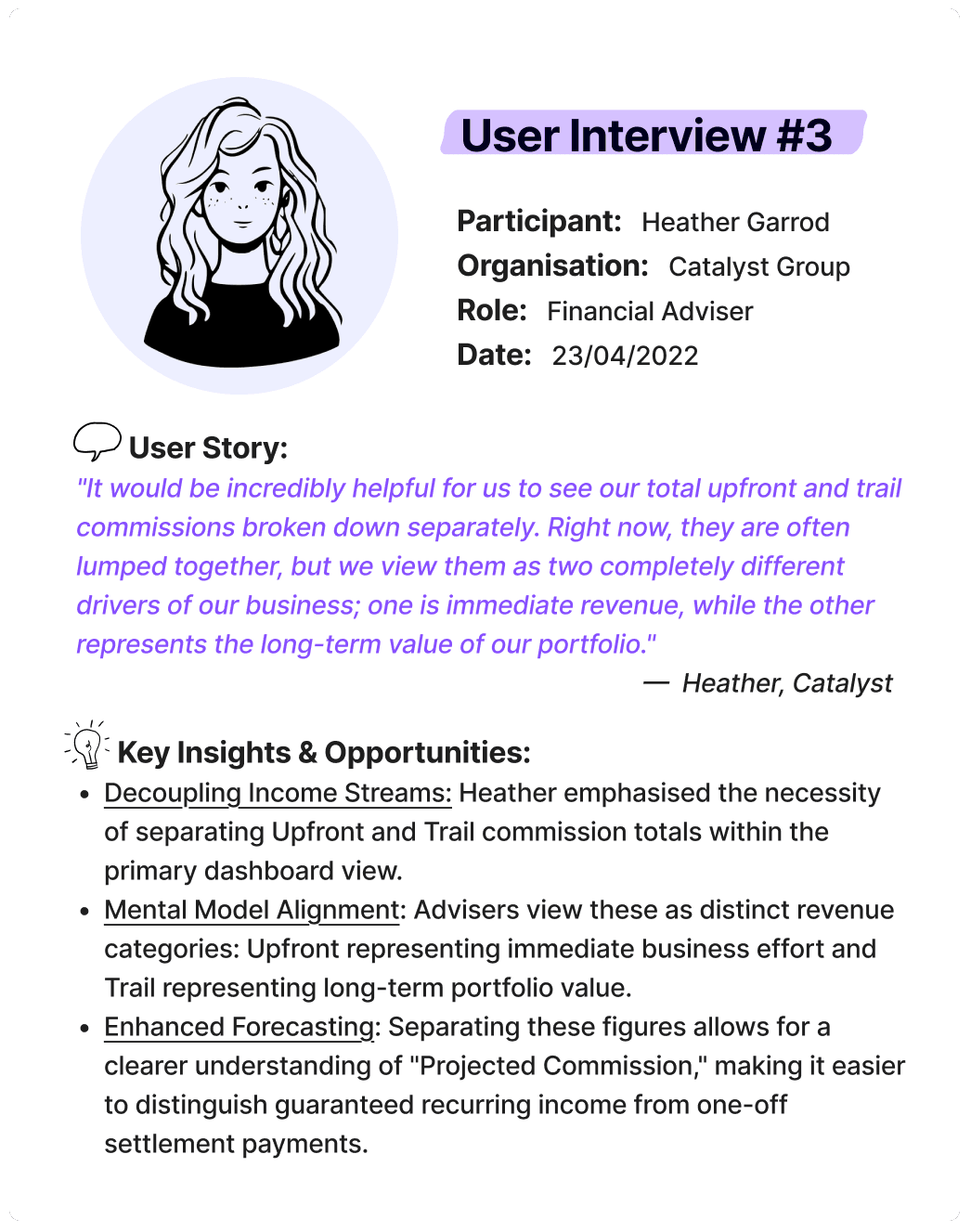
I spoke with Heather from Catalyst, who provided a crucial refinement that changed our data hierarchy:
Four Types of Commission
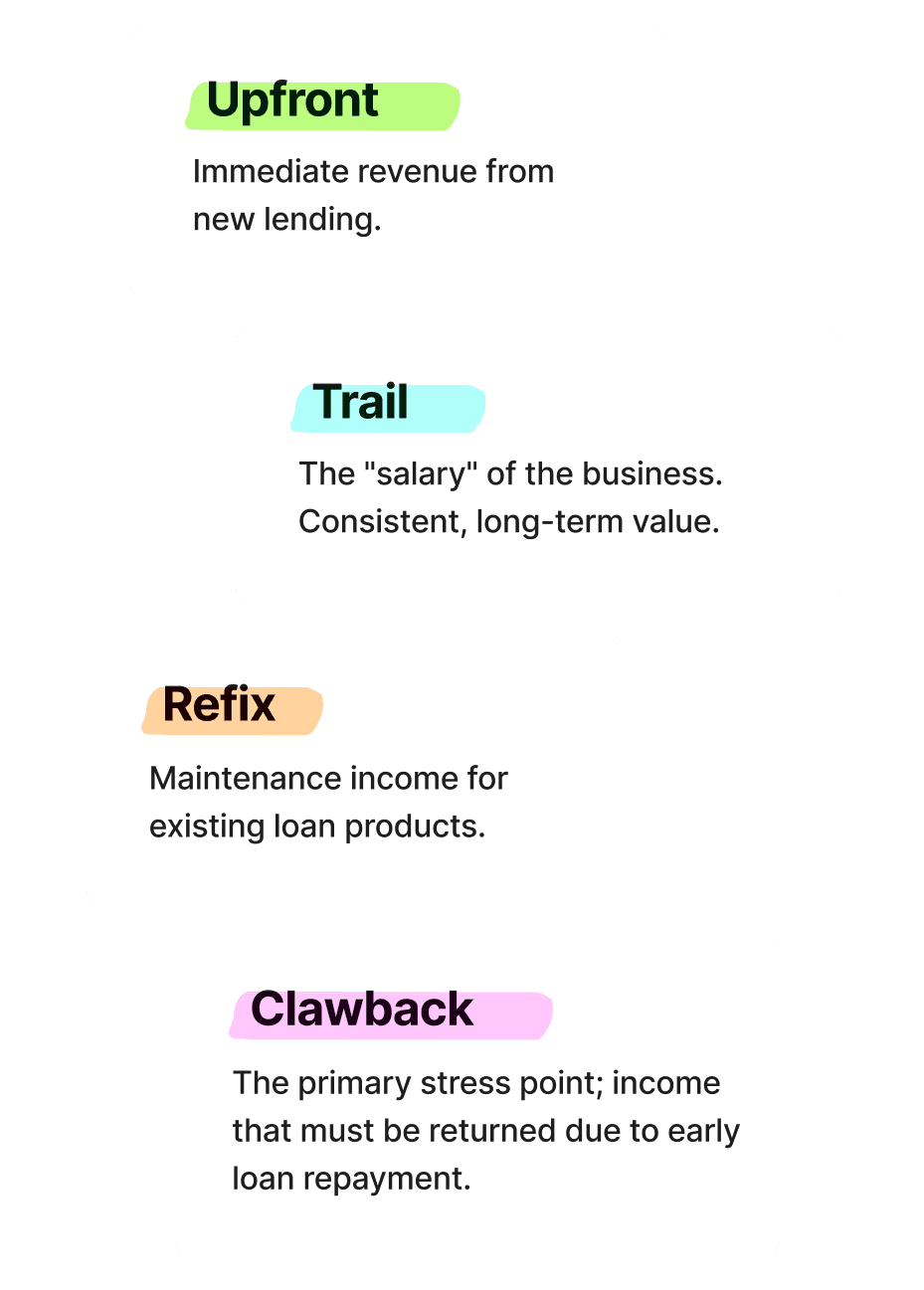
To make the data approachable, we categorized every transaction into four types: Upfront, Trail, Refix, and Clawback.
Defining Success
Acceptance Criteria
Before moving into wireframing, I established clear success criteria for each high-priority user story. The goal was to ensure the dashboard solved the “Excel Hell” problem by making critical business data instantly accessible and secure.
Click to expand
Ideation
Design Opportunities
MVP Dashboard
While building the full suite, we deployed a brief “placeholder” dashboard to bridge the gap. This allowed us to test data accuracy with users while we finalised the more complex interactive components like the Projected Trail and Lender Breakdown
Click to expand
Ideation
Low-Fidelity Experimentation
My early sketches focused on moving away from the ‘row-and-column’ mindset of the old Excel receipts. I prioritised a 12-month rolling view to give advisers a clean look at their annual performance.
Click any sketch to expand
Design
Final Design
The Dashboard Experience
The final design transitions the adviser from the passive receipt of data to active, strategic oversight. The dashboard is a modular command center where every visualisation is interactive, “drillable,” and designed to reduce the cognitive load of financial management.

GLOBAL FILTERS
The Fund Comparison Tool
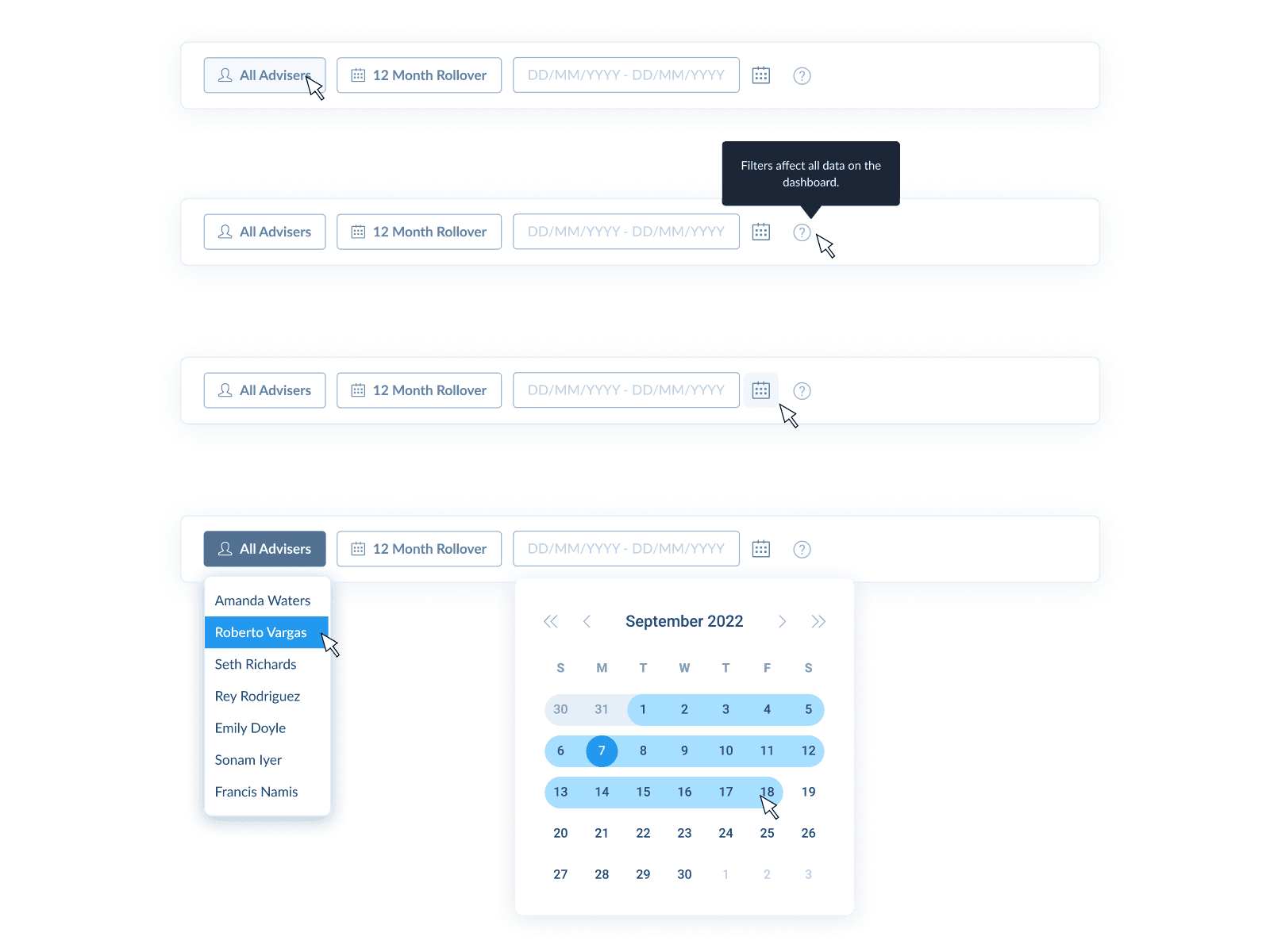
To maintain a single source of truth across multiple complex data sets, I implemented a global filter bar at the top of the page. Users can filter data to a specific adviser or multiselect a custom group to compare team performance. The dashboard defaults to a 12-month rollover for consistent annual tracking, but users can also toggle between predefined periods like ‘This Financial Year’ or ‘This Quarter’ to align with tax and reporting cycles.
SUMMARY METRICS
Quick Analytics
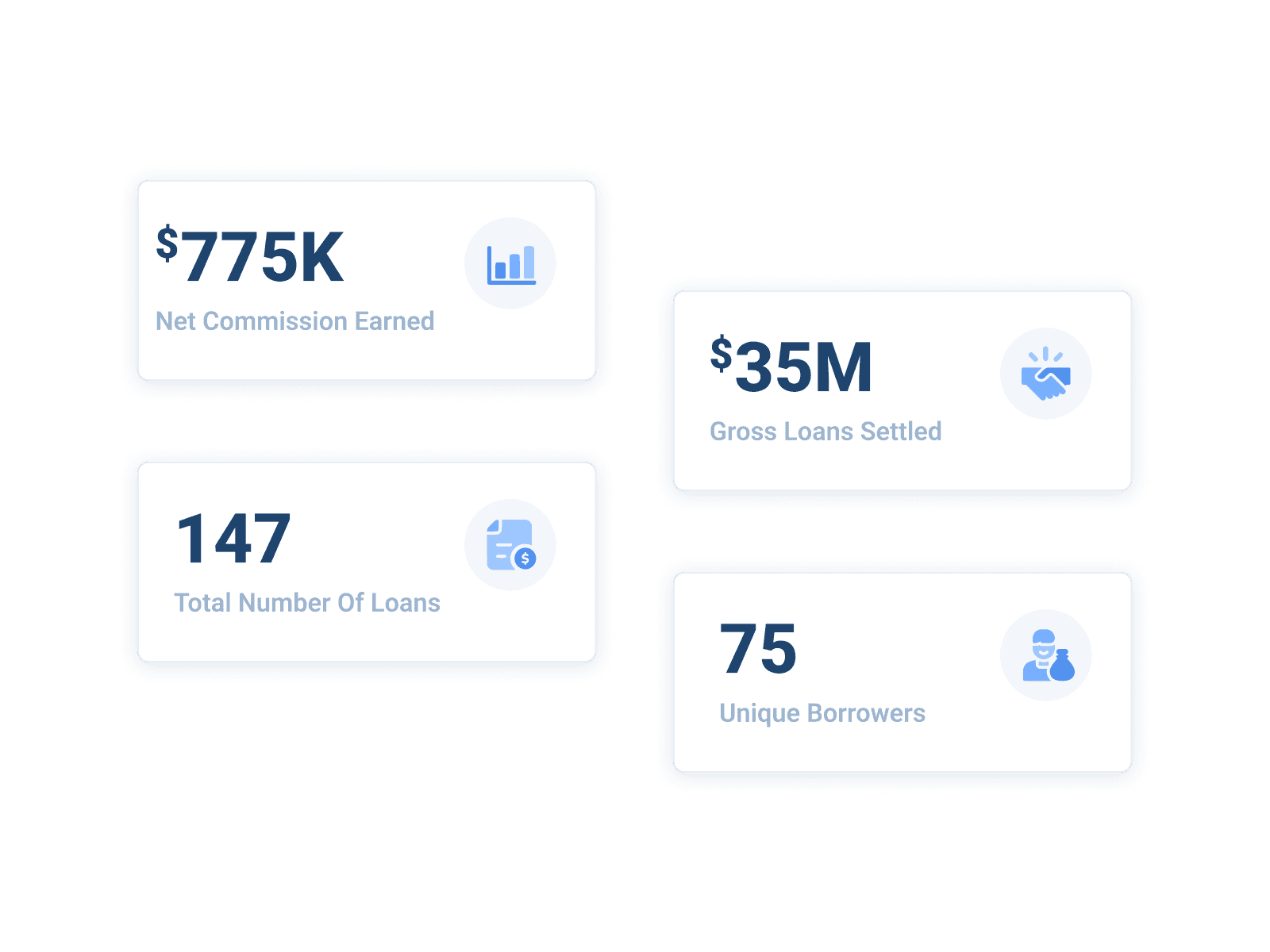
Positioned at the top for immediate impact, four high-level metric cards provide an 80/20 view of business health without requiring a single scroll. These include net commission earned as the absolute bottom line, gross loan settlement to visualise the total volume of business generated, and total number of loans alongside unique borrowers to help advisers understand their conversion efficiency and whether they are doing many small loans or focusing on high-value clients.
COMMISSION OVERVIEW
The Commission Overview
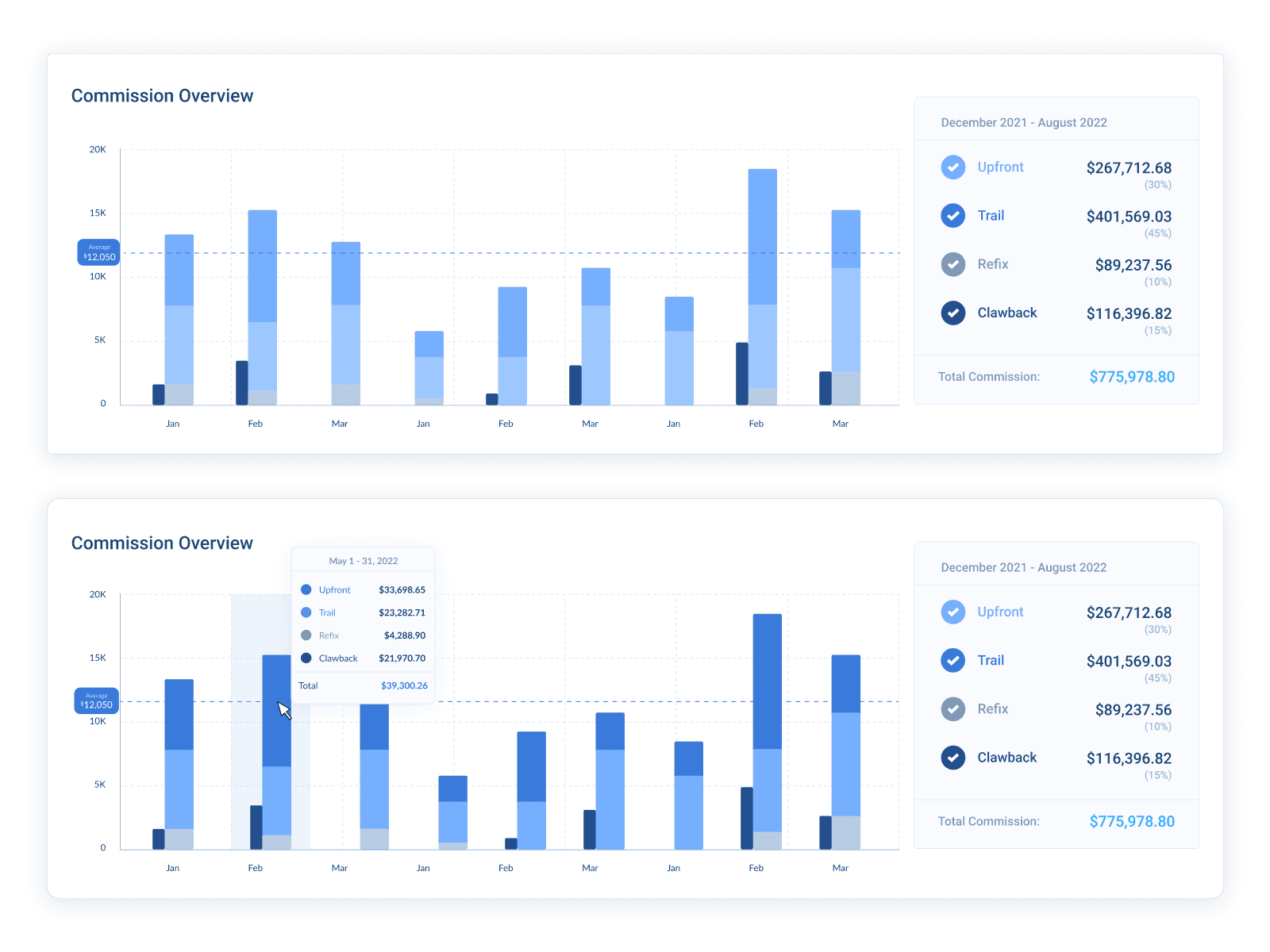
This stacked bar graph provides a comprehensive narrative of monthly income. Every month is segmented by colour into Upfront, Trail, Refix, and Clawback, making high-stress events like clawbacks visually distinct rather than hidden in a spreadsheet row. A blue dashed average line runs across the y-axis, giving advisers an instant baseline to judge if their current month is over-performing or under-performing.
UPFRONT COMMISSION
Upfront Commission Graph
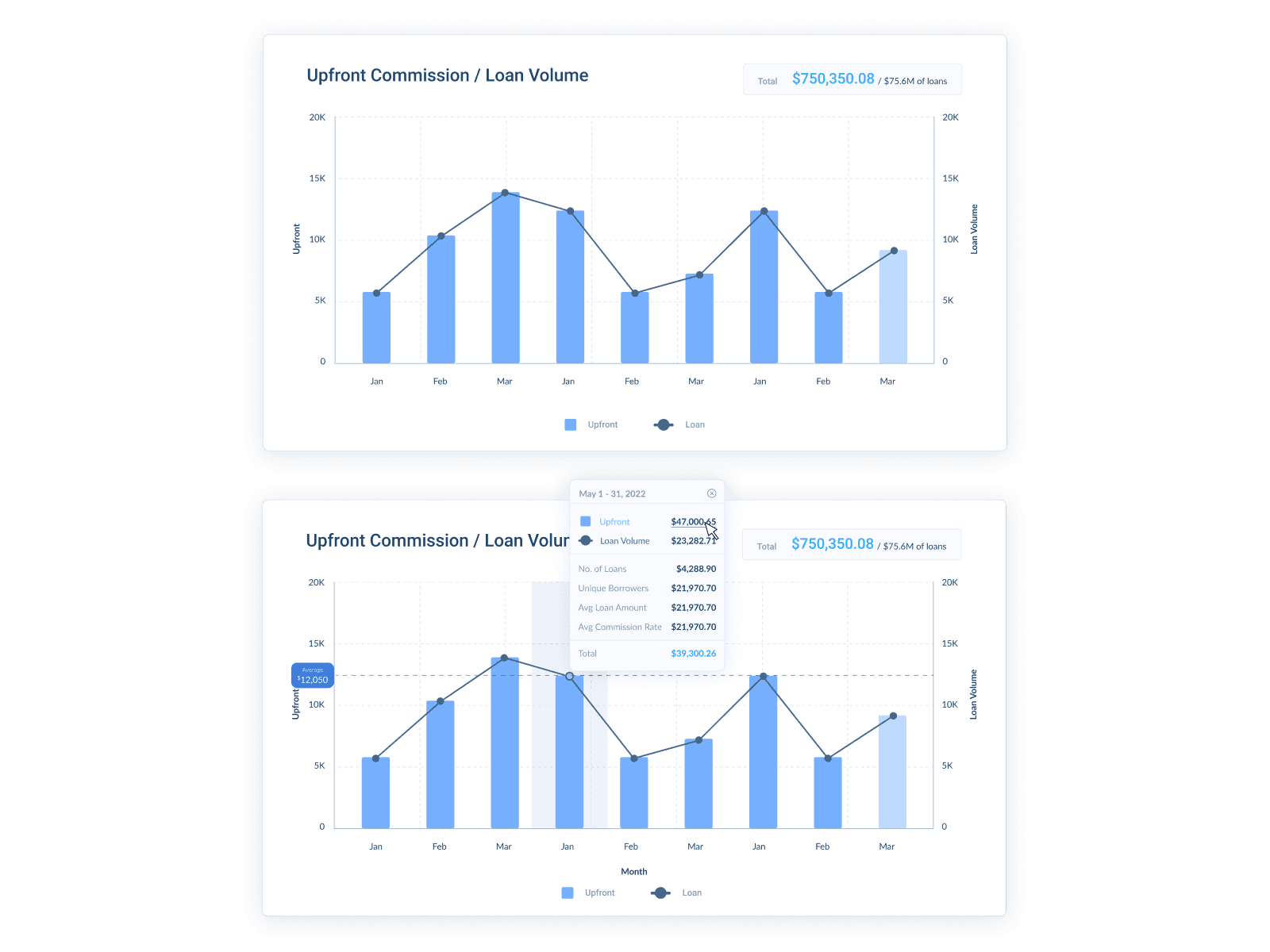
This composite graph plots upfront earnings as bars against total loan volume as a line, allowing advisers to ensure their effort in volume is resulting in the expected reward in commission. It also supports hover popovers and click-to-modal functionality for deep record auditing.
TRAIL COMMISSION
Trail Commission Graph
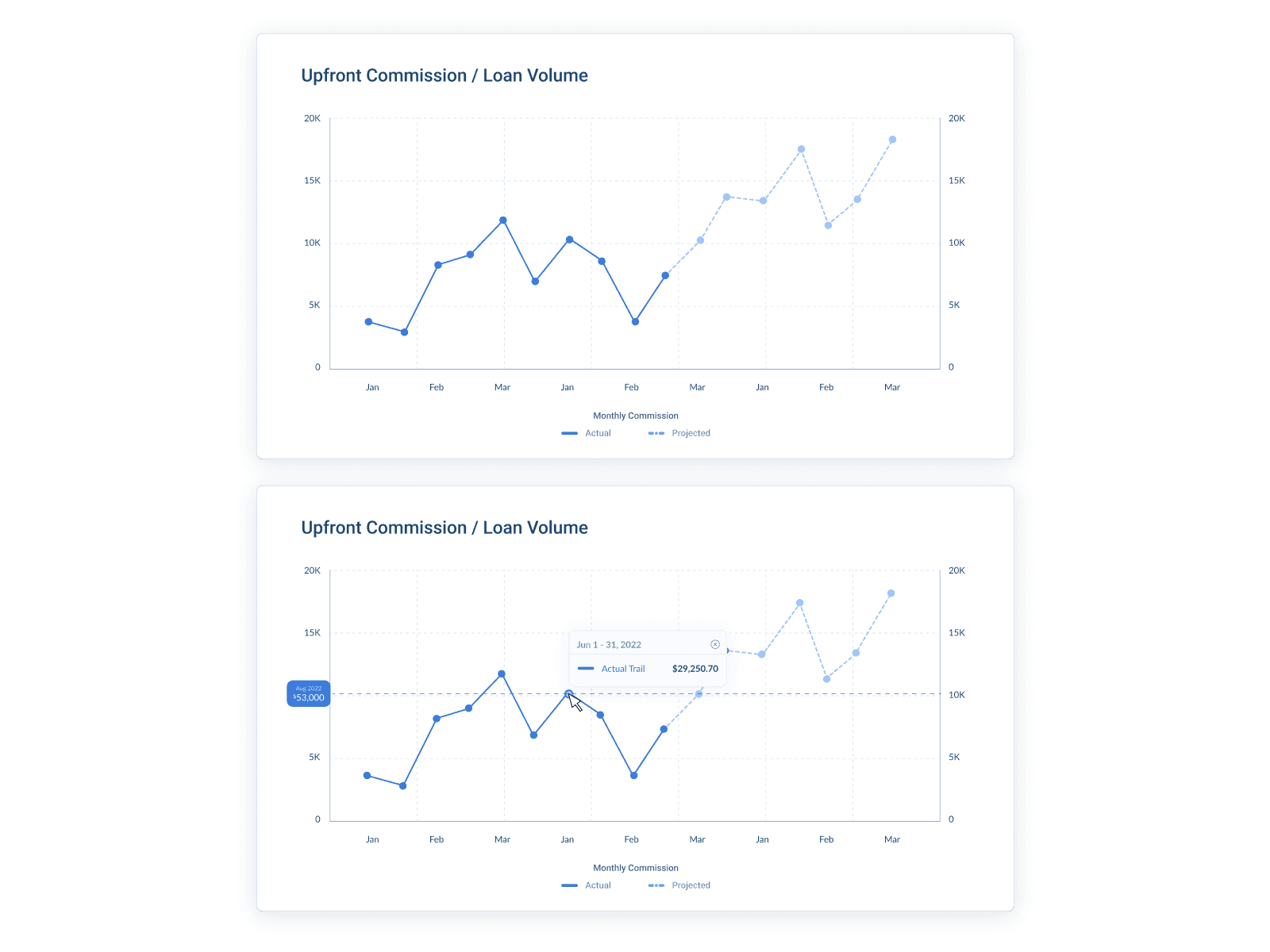
Moving from historical tracking to psychological certainty, this graph visualises the business’s long-term value. It uses a solid line for actual payments and transitions into a dashed line for a 12-month projection based on current lender policies and loan products. This helps advisers plan for future hiring or business expansion by seeing exactly how their recurring salary is scaling.
INTERACTIVE ALLOCATION
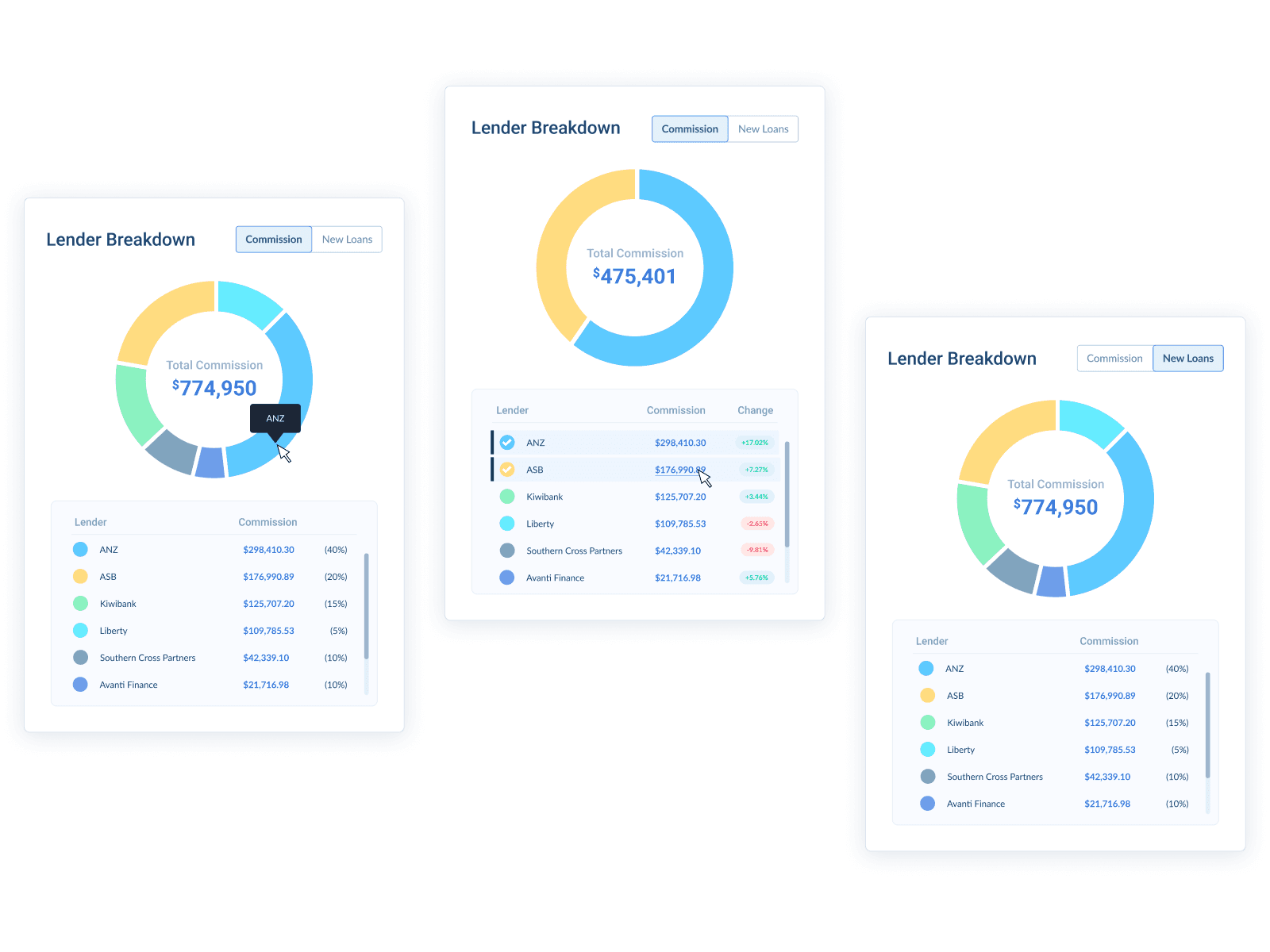
Lender Breakdown
Users can switch between Commission and New Loans views to uncover strategic misalignment; for example, if 60% of an adviser’s volume is with one bank but only 30% of their profit comes from them, the dashboard highlights that discrepancy. Clicking any lender in the legend also pulls up a modal of all commission items associated with that specific bank.
NATIVE RECEIPT
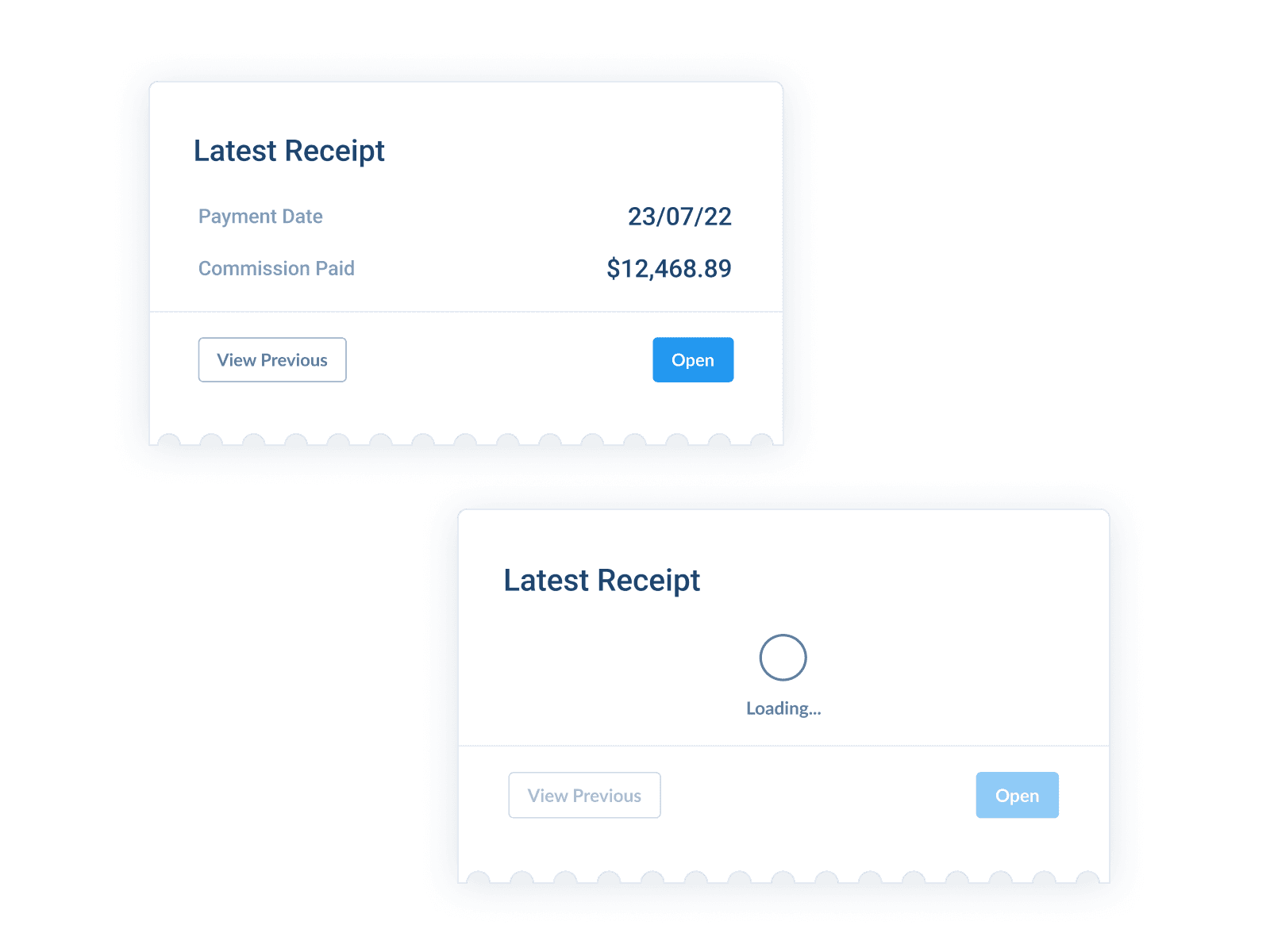
Native Receipt Widget
To respect the legacy workflow while improving it, I included a Latest Receipt widget that displays the KAN payment date and the total commission paid for the most recent cycle. An Open button allows the user to view the official PDF receipt natively within Trail, eliminating the need to search through email inboxes or file folders.
Results
Dashboard Prototype
The dashboard is live and fully interactive. Filter advisers, toggle date ranges, and drill into the charts to explore the experience for yourself.
Reflection
Learnings
Technical UX: The Name Game
The biggest challenge was Adviser Alias Matching. Lenders send data with “messy” names (e.g., “S. Craft” vs “Sarah Craft”). I designed an “Other” category in the filters to ensure that even unmatched data remained visible while the system's mapping logic improved.
Final Thoughts
This project taught me that the best dashboard designs aren't just about pretty colors - they are about reducing cognitive load. By moving the financial story from a spreadsheet to a visual narrative, we gave advisers back their most valuable asset: time.
Next Steps
Native Engine Integration
Migrate the commission engine from external Google Sheets into Trail to support native calculations and allow commission payments directly to individual advisers. This would mainly be internal for our Commission Admin Team!
User Self Service
Develop a UI that empowers users to reassign commission items themselves to different advisers or organisations